> For the complete documentation index, see [llms.txt](https://docs.pletor.ai/llms.txt). Markdown versions of documentation pages are available by appending `.md` to page URLs; this page is available as [Markdown](https://docs.pletor.ai/documentation/changelog/readme.md).
# Changelog
Product updates and improvements you should be aware of
{% updates format="full" %}
{% update date="2026-10-19" tags="models" %}
## Krea 3 & HeyGen Video 1.0 are here
Two new models in the library.
🖼️ **Krea 3**: built for creative direction. When the leading models can't get you where you want, Krea 3 is a strong contender. It combines up to 4 references in an edit, and can expand your prompt and pick the aspect ratio for you.
🎬 **HeyGen Video 1.0**: HeyGen's first general-purpose video model. 5 to 15 second clips, with dialogue, ambience and sound effects in the same run. Start from a prompt, a first frame, or your own references.
{% endupdate %}
{% update date="2026-10-14" tags="quality-of-life" %}
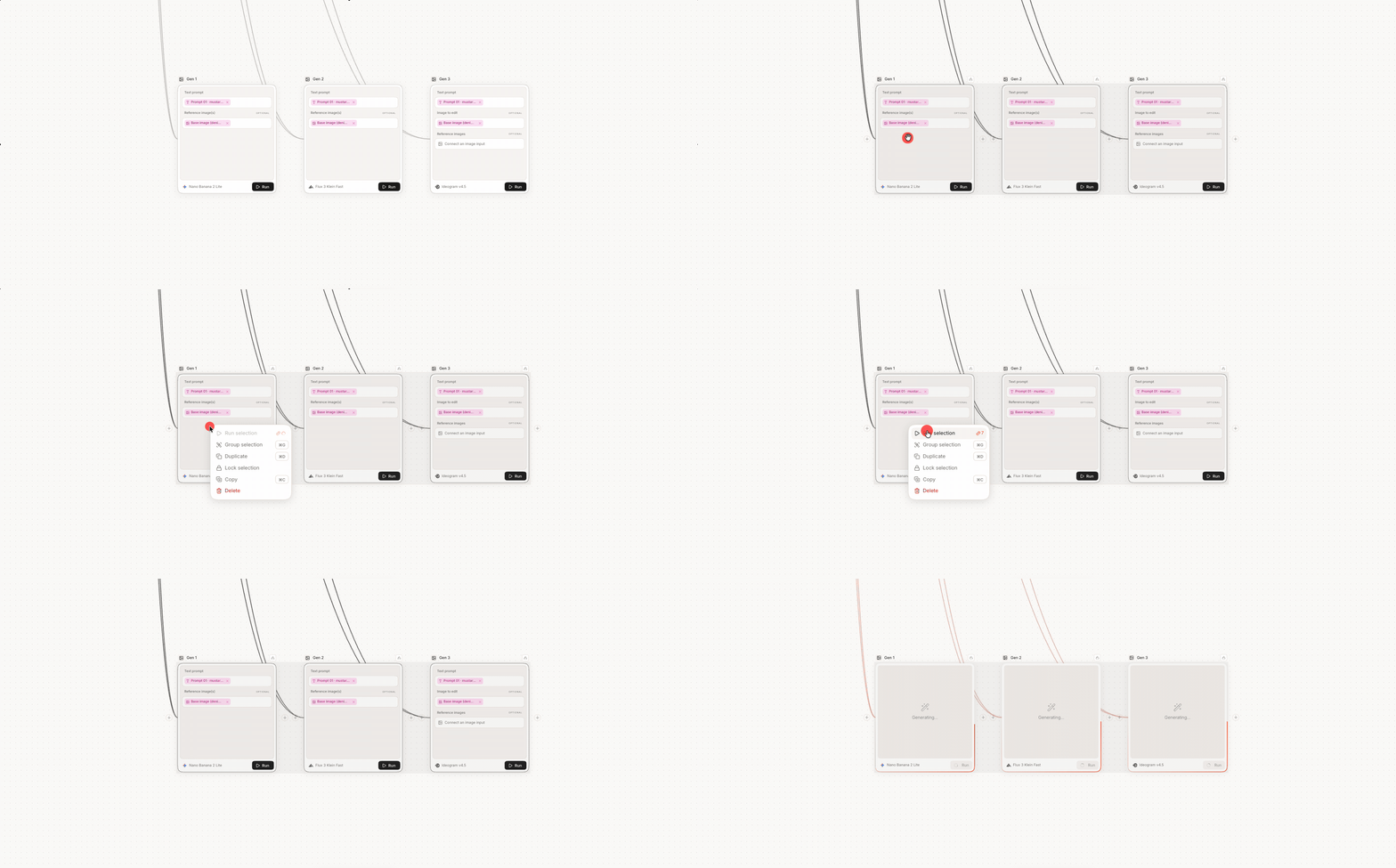
## Colored node groups & run a selection
Two upgrades for building Flows.
**Colored node groups**: give each group its own color. Large Flows read at a glance, and the stage a teammate needs to touch stands out.
**Run a selection**: select a few nodes and run only those. Iterate on one part of a Flow without re-running the whole thing.
{% endupdate %}
{% update date="2026-10-02" tags="models" %}
## Flux 3 Image & Ideogram 4.5 are here
Two new image models, both built for precise edits.
🖼️ **Ideogram 4.5**: Ideogram's most precise editing model yet. It only changes what you ask for, so that your edits hold across repeated iterations.
🖼️ **Flux 3 Image**: Black Forest Labs' new image model. Change one element across multiple turns and every other pixel stays put. Compose from up to 10 references, in up to 4K.
{% endupdate %}
{% update date="2026-09-24" tags="collaboration" %}
## Share your sessions and Brains
Send any Create session as a link. Whoever opens it sees the real runs, not screenshots, and can remix from there.
Brains travel too: share one with a teammate, or hand it over when a project changes owners.
Also new: your Brain now writes in your language.
{% endupdate %}
{% update date="2026-09-24" tags="models" %}
## Sora 2 is leaving the library
Sora 2 is no longer available on Pletor, due to OpenAI's decision to stop distributing the model. Its direct replacement is already live: [**Seedance 2.5**](https://docs.pletor.ai/models/video-models/seedance-2.5).
Why Seedance 2.5:
* **30-second clips** in a single run, with video extension for longer ads.
* **Finer creative control**, including bold camera moves.
* **Large reference budgets**: up to 30 images, 10 videos and 10 audio clips per run.
* **Now in 1080p.**
{% endupdate %}
{% update date="2026-09-23" tags="quality-of-life,assets" %}
## Crop assets
Crop straight from the asset view, with more precise controls and AI filling.
The same Crop is now a node, so every output from a Flow or a Batch comes out at the exact frame you need.
{% endupdate %}
{% update date="2026-09-21" tags="models" %}
## New video & music models
Three additions to the library.
🎬 **Flux 3 Video edit**: video-to-video editing is now live on Flux 3. Bring your own clip and change it: same model, same native audio, now with editing instead of generation-only.
🎬 **H3 Max Lipsync**: our new default for lip sync. Sync any voice track to a talking-head video.
🎵 **ElevenLabs Music v2.5**: a new default music model. Fuller arrangements, more natural-sounding instruments, and more movement through a track. Music v2 stays available if you prefer it.
{% endupdate %}
{% update date="2026-09-17" tags="models" %}
## New text models: GPT-6 Astra, Claude Fable 5.1 & Claude Opus 5
Three new SOTA text models join the library.
**GPT-6 Astra**: OpenAI's most capable model yet, for complex reasoning, coding, computer use and multi-step research.
**Claude Fable 5.1** & **Claude Opus 5**: Anthropic's latest, for stronger reasoning and analysis across your workflows.
{% endupdate %}
{% update date="2026-09-15" tags="systems" %}
## Meet Pletor 2.0
We've rebuilt how you create with Pletor. It's two things.
**1. A new way to create with AI with Pletor's Agent.** The best of an infinite canvas, coupled with an agent that carries our own experience creating with AI, plus your brand context. Describe what you need in plain language, and Pletor delivers the assets on a canvas where you iterate in one click. No nodes required. [Try it here](https://app.pletor.ai/create).
**2. An updated** [**Brain**](https://docs.pletor.ai/build-your-system/brain)**.** Sharper brand context feeding every run: identity, products, top performers and more. [Build yours here](https://app.pletor.ai/brains).
Nodes are great when you want high creative control or a scalable production pipeline. But a lot of the work sits in the middle: you know what you need, you just want it made, on brand. That's what the agent is for, coupled with your Brain.
{% embed url="" %}
{% endupdate %}
{% update date="2026-09-15" tags="systems" %}
## Agents are now Flows
Same systems, new name. Pletor 2.0 is the agent, Flows are what it runs.
Now that Pletor itself acts as your agent, "an agent calling agents" no longer described what's happening.
Flows says it plainly: production you set up once and run from anywhere.
What's not changing: every Flow you've built keeps running, and there's nothing to migrate.
{% endupdate %}
{% update date="2026-09-09" tags="models" %}
## GPT Image 2.5 is here
OpenAI's new flagship image model is now available on Pletor, in two variants.
What's new:
* **Better edits & stronger fidelity.** Change the product, the background, or a line of copy. Subject, composition and brand treatment stay untouched.
* **Consistency across long editing sessions.** Each edit builds on the last, with almost no quality degrading over successive turns.
* **Up to 50% faster than GPT Image 2**, with more natural lighting and richer textures.
Two variants, both live in the library:
* **Flare**: the default. Fast, high quality, built for high-volume work, PDP visuals and social creative.
* **Sunburst**: slower, more precise. For production-ready campaign creative and polished product imagery where every edit has to land.
{% endupdate %}
{% update date="2026-08-28" tags="models" %}
## Minimax H3 Max is here
The fastest top-tier video model right now.
A five second clip comes back in five seconds, at a quality that holds up against Seedance.
{% endupdate %}
{% update date="2026-08-27" tags="models" %}
## August video updates
🎬 **Gemini Omni Flash 1.1**: an upgrade to Omni Flash, Google's video model built for editing.
🎬 **Wan 3.0**: Alibaba's latest video model, strong on motion and prompt adherence at a competitive cost per run.
🎬 **Seedance 2.5 in 1080p**: the best video model, now rendering natively at 1080p.
🖼️ **Recraft v4 now takes references**: feed it a reference image and keep its editorial output anchored to your own visual direction.
{% endupdate %}
{% update date="2026-08-27" tags="models" %}
## Model deprecations
Two models are leaving the library. Both have a direct replacement already live:
* **Google Veo 3.0** → [**Veo 3.1**](https://docs.pletor.ai/models/video-models/google-veo3.1). Same family, better control and audio.
* **Reve** → [**Krea 2**](https://docs.pletor.ai/models/image-models/krea-2), our recommendation for editorial-leaning image work.
{% endupdate %}
{% update date="2026-08-18" tags="quality-of-life" %}
## Connect multiple nodes at once
Now you drag a selection, pull once, and every connection lands.
{% endupdate %}
{% update date="2026-08-13" tags="building-tools" %}
## Reframe video node
Adapt any video to a new aspect ratio in one node. Powered by LTX 2.3 Reframe, it recomposes the frame instead of cropping it.
{% endupdate %}
{% update date="2026-08-12" tags="models" %}
## New models
Three additions to the library:
🎬 **Minimax H3**: MiniMax's new flagship video model. 5–15 second clips at 2K with native stereo audio in a single pass. Direct competitor to Seedance 2.0.
🖼️ **Grok Imagine 2.0**: xAI's latest image model, built for precision. Sharp typography in dense layouts and stronger image edits.
🖼️ **Higgsfield Soul 2**: fashion-grade realism with raw aesthetic built in. Images that feel shot, not generated.
{% endupdate %}
{% update date="2026-08-07" tags="models" %}
## Seedance 2.5 is here
ByteDance's new flagship video model is now available on Pletor.
What's new:
* 30-second clips in a single run: double the previous ceiling. Pair with video extension for minute-long ads.
* Sharper realism and finer creative control, including bold camera moves.
* Massive reference budgets: up to 30 images, 10 videos (30s combined) and 10 audio clips (30s combined) per run.
* Negative prompts that stick. Prompts like "no subtitles, no background music" finally holds.
{% embed url="" %}
Read more [here](https://docs.pletor.ai/models/video-models/seedance-2.5).
{% endupdate %}
{% update date="2026-08-05" tags="models" %}
## Flux 3 is here
Black Forest Labs' new multimodal model is now available on Pletor.
What’s new:
* 20 second clips
* State-of-the-art photorealism
* Shot-level control with keyframes
* Native audio with dialogue in 13+ languages
{% embed url="" %}
{% endupdate %}
{% update date="2026-07-30" tags="systems" %}
## Connectors
Plug your stack into Pletor once, and pull directly from the tools your team already uses.
Connect Dropbox, Google Drive, Sheets, Airtable, and Shopify from the new Connectors hub, then bring live assets, product data and real SKUs into any Batch.
Full setup guide [here](https://docs.pletor.ai/automate/connectors).
{% embed url="" %}
{% endupdate %}
{% update date="2026-07-29" tags="quality-of-life" %}
## Text edit: every line is now editable
Fixing one word in a visual used to mean re-prompting until the model complied. Now every line comes back as a field you can edit.
Fix the headline, correct the CTA, swap the locale. Fonts stay locked.
No more re-prompting or manual editing.
Text is text again.
{% embed url="" %}
{% endupdate %}
{% update date="2026-07-20" tags="building-tools" %}
## Compose videos with Timelines
Sequence clips, text, and audio on a multi-layer timeline, directly from the [Composer](https://docs.pletor.ai/build-agents/nodes/composer).
Compose once, run it across hooks, catalogs, and language versions.
A demo agent is [available here](https://api.pletor.ai/s/68e0ac4a-74a2-4ea9-81c6-ef465153a8e7).
{% embed url="" %}
{% endupdate %}
{% update date="2026-07-15" tags="models" %}
## New models
Three additions to the library:
🖼️ **Seedream 5.0 Pro & Lite**: Pro for final assets, Lite for fast iteration and high-volume drafting. Read more [here](https://docs.pletor.ai/models/image-models/seedream-5.0-pro).
🖼️ **Reve 2.1**: sharper typography and layout control, for creative that needs text baked in.
🎬 **Veed Lip Sync 2.0**: sync any voice track to a talking-head video. Localize one shoot across markets, or swap the script without re-filming.
{% endupdate %}
{% update date="2026-07-02" tags="systems" %}
## Brain: your brand's living memory
Your brand book, assets and tone of voice used to sit in static files nobody reads. Now they become the layer every agent runs on.
{% embed url="" %}
Drop your guidelines, tone, brand assets and top-performing content into Brain once. From then on, every agent draws on it automatically. The same brand on the first asset and the five-hundredth.
**What’s new**:
* **Brand ingestion.** Drop in your brand book, assets, tone of voice and top-performing content. Brain encodes it into a persistent layer.
* **Build with Brain.** Open Pletor Chat, pick a brain, then build agents that create on-brand from the first run.
* **(Soon!) Synced context.** Drop your Brain into the Studio and every agent draws on it by default. No re-briefing.
Available now in Beta for Studio and Enterprise plans.
Build your brain [here](https://app.pletor.ai/brains/).
Join the Beta [here](https://forms.gle/pZav2m5tw8ifuUfG8).
{% endupdate %}
{% update date="2026-06-30" tags="models" %}
## **Gemini Omni Flash + Nano Banana 2 Lite**
Two new Google models are now available on Pletor.
**Nano Banana 2 Lite**
A fast image model that generates in seconds. It replaces Nano Banana as the default for most use cases. Best for fast iterations where speed matters more than max resolution, and for high-volume drafting and variant testing.
[Read more here](https://docs.pletor.ai/models/image-models/nano-banana-2-lite)
**Gemini Omni Flash**
A new video model built for editing, combining video generation and natural-language editing in one model. Refine a video with a follow-up prompt instead of a full re-generation, and combine text, image, and video inputs for tighter creative control.
[Read more here](https://docs.pletor.ai/models/video-models/gemini-omni-flash-1)
{% endupdate %}
{% update date="2026-06-26" tags="models" %}
## New models
Two new models join Pletor:
🎬 **Seedance 2.0 4K & Seedance 2.0 Mini:** native 4K resulotion and a faster version of Seedance 2.0.
**Happy Horse 1.1**: Alibaba's latest video model, same league as Kling 3.0.
{% endupdate %}
{% update date="2026-06-25" tags="building-tools" %}
## New templates
Some fresh pre-built agents to help you build your own:
* [Storyboard to video clip](https://api.pletor.ai/s/02605288-ccd6-459e-a878-a606689c52b5) — create dynamic videos from a storyboard using GPT Image 2 and Seedance 2.0.
* [360 Product Video](https://api.pletor.ai/s/5d47bbca-c5e3-47f8-9c24-eb0424c3752c) — turns your product photos into a video into a clean, spinning studio showcase video of it.
* [Street Ad remixer](https://api.pletor.ai/s/90a81928-62d5-417d-932c-da6b6efa38c4) — transform out-of-home ads into ready-to-use digital assets for your brand.
* [Model creator](https://api.pletor.ai/s/ef920f68-50d2-49c1-a785-552f7f5fadef) — generate realistic, ready-to-use model images for e-commerce, virtual try-on, and storyboarding.
* [Y2K photoshoot](https://api.pletor.ai/s/fb0b025f-11db-47df-87a1-852640003d60) — create Y2K style photoshoots from a moodboard, product, and model image.
* [Product to static + video ads](https://api.pletor.ai/s/bb37fdff-47b6-4011-b118-3ba261738ccb) — turn a product photo and brand brief into complete ad campaigns, from strategy to static assets to video.
{% endupdate %}
{% update date="2026-06-19" tags="models" %}
## New models
Two models join Pletor:
🎬 **Kling 3.0 4K:** Kling's best video model, now rendering natively at 4K resolution.
🖼️ **Ideogram v4:** an image model that gets text & photorealism right. Read more [here](https://docs.pletor.ai/).
{% endupdate %}
{% update date="2026-06-16" tags="building-tools" %}
## Run Apps by API
Every app you've built in Studio is now an endpoint. Wire them into pipelines, schedule them, or call them from your product.
→ [API reference](https://docs.pletor.ai/documentation/api-reference/apps)
{% endupdate %}
{% update date="2026-06-11" tags="building-tools" %}
## Trim node
Cut to the moment that matters.
Trim any video to the exact in and out points, and speed it up in seconds, all in one node:
{% embed url="" %}
The Merge audio + video node has also been upgraded with multi-track and volume control.
{% endupdate %}
{% update date="2026-06-09" tags="systems" %}
## Custom App forms
Shape every app's form around the inputs that matter. Add text fields, dropdowns, or media uploads, so whoever runs it hands over exactly what your agent needs.
{% embed url="" %}
A few use cases it unlocks:
* Localize in one run: a dropdown picks the market, the app ships creative in the right language
* PDP visuals at scale: a media slot for the packshot, plus angle and setting fields
* On-brand by default: pre-set creative or model directions for non-technical teammates
See more [here](https://docs.pletor.ai/automate/apps).
{% endupdate %}
{% update date="2026-06-04" tags="systems" %}
## Pletor Batch
Build a workflow once, then run it on hundreds of inputs in a single pass instead of one at a time.
* Feed it a folder of packshots, an Airtable, or a Shopify export
* Each row runs your full workflow (e.g. packshot to PDP visual, catalog ads)
* Review results in one place: keep what shipped, re-run what didn't, export the rest
Available to paid workspaces now. Open Batch [here](https://app.pletor.ai/batch) or from your workspace nav to start.
{% embed url="" %}
{% endupdate %}
{% update date="2026-06-04" tags="quality-of-life,systems" %}
## Smoother App updates
Re-publish from a new version through "Update App". No more back-and-forth.
{% endupdate %}
{% update date="2026-06-03" tags="quality-of-life,building-tools" %}
## List selector now handles media
Feed it images, video, or audio — not just text — and pick which ones move forward.
Build multi-branch and visual workflows, with full control over which outputs move on to the next node.
{% endupdate %}
{% update date="2026-06-03" tags="models" %}
## New models in the library
Three models join Pletor, ready to run in any workflow:
🎬 **Grok Imagine Video 1.5:** xAI's latest video model, for motion straight from a prompt and a start frame.
🖼️ **Krea 2:** an image model with a distinct aesthetic. Great for style directions, moodboarding, and more. Available in Standard and Pro: pick the fidelity-to-cost tradeoff per run.
✍️ **Claude Opus 4.8:** Anthropic's latest, powering the reasoning and analysis steps across your workflows.
🎬 **Veed Subtitles**: clean, automatic subtitles for your videos.
{% endupdate %}
{% update date="2026-05-20" tags="systems" %}
## Pletor MCP
Your Pletor agents now plug into Claude, Cursor, or any AI that speaks MCP, and into the rest of your stack.
{% embed url="" %}
A few ways teams are using it:
* Orchestrate end-to-end with Claude: pull assets from Airtable → run your PDP workflow → push to Shopify
* Analyze winning Meta ads, then feed those patterns into your Pletor Meta Ads workflow
* Scrape a product page → extract benefits and packshots → generate promo videos, one per product
Install the MCP
{% endupdate %}
{% update date="2026-05-20" %}
## New pricing, new perks
**Meet Studio:** a new plan built for teams shipping at volume. More credits in the base plan, a better price per credit, and a 3-month credit rollover.
**Going yearly?** Save 20% on any plan.
**Now included in every paid plan:**
* **Invite your team** — no more seat limits, bring as many teammates as you want
* **API & MCP access** — build Pletor directly into your stack ([docs](https://docs.pletor.ai/documentation/api-reference))
And if you're on the $49 plan: **1-month credit rollover**, new this update
→ \[[See the new plans](https://www.pletor.ai/pricing)]
{% endupdate %}
{% update date="2026-05-18" tags="assets" %}
## Asset tags
Organize your assets the way your team actually works. No more digging.
{% endupdate %}
{% update date="2026-05-18" tags="assets" %}
## Richer exports
Export images in JPG or WebP and set your personal default.
{% endupdate %}
{% update date="2026-05-14" tags="collaboration" %}
## Your teams, your rules
Advanced control for demanding teams. Decide which models your team can access, and set per-user credit quotas to keep usage predictable. Available within Studio and Enterprise plans.
Model access
User quotas
{% endupdate %}
{% update date="2026-05-12" tags="quality-of-life" %}
## More control over every run
See what each run will cost before launching.
{% endupdate %}
{% update date="2026-05-07" tags="quality-of-life" %}
## Better image editing
Brush exactly where you need it. A faster, more precise last mile.
{% endupdate %}
{% update date="2026-05-07" tags="models" %}
## New models
A fresh wave dropped on Pletor:
🖼️ **Grok Imagine upgrades**: 2K resolution, new aspect ratios, and Grok Imagine Pro
✍️ **Gemini 3.5 Flash**
✍️ Latest OpenAI text models (GPT 5.4 / 5.5)
{% endupdate %}
{% update date="2026-04-23" tags="building-tools" %}
## Pletor Chat: stop building from scratch
The gap between "I know what I want to produce" and "I have a working workflow" is where most time gets lost. Dragging nodes, wiring connections, configuring settings. That's mechanical work, not creative work.
Pletor Chat sits inside Studio and does the assembly for you.
{% embed url="" %}
Write or talk, your call:
* Describe what you want → it builds the full workflow
* Upload a reference asset → it reverse-engineers the production steps
* Refine by conversation: "swap to Kling 3.0," "add a resize step" — it modifies the existing graph
You stay in control. Chat handles the plumbing.
{% endupdate %}
{% update date="2026-04-22" tags="models" %}
## New state-of-the art models
A wave of SOTA models, all live on Pletor:
🖼️ [GPT Image 2](https://docs.pletor.ai/ai-model-library/image-models/gpt-image-2) — best-in-class text rendering and prompt adherence. Reasons before it draws, so complex prompts land on the first try.\
🎬 [Seedance 2](https://docs.pletor.ai/ai-model-library/video-models/seedance-2.0) — multimodal video (text, image, video, audio as references) with native audio. Now with looser input restrictions vs. its initial release.\
⚡ [Veo 3.1 Light](https://docs.pletor.ai/ai-model-library/video-models/google-veo3.1) — the same Veo quality, tuned for speed and cost. Built for high-volume generation.
{% endupdate %}
{% update date="2026-04-21" tags="resources" %}
## Pletor Academy: learn faster, earn credits
A new home to get fluent in Pletor:
* Curated tutorials, from Foundations to Advanced
* Complete challenge tracks → unlock credits as you go
* Join the Discord, level up, become a Pletor expert
Open the Academy
{% endupdate %}
{% update date="2026-04-14" tags="quality-of-life" %}
## Multi-select assets
Batch download, archive, or bookmark in one click:
{% endupdate %}
{% update date="2026-04-10" tags="building-tools" %}
## Stronger video & audio workflows
New nodes to compose richer outputs:
🎵 Merge Audio & Video — stitch generated audio onto your video output\
🔊 Extract Audio — pull the track from any video to re-use it
{% endupdate %}
{% update date="2026-03-27" tags="building-tools" %}
## New tools to build
#### Change camera angles
Adjust the point of view of your image, without the re-prompting:
#### Generate music
Use the best music generation models within your creations:
#### Rename
Set a dynamic naming convention for assets you generate on Pletor:
#### Router
Send outputs down different paths across your workflow:
{% endupdate %}
{% update date="2026-03-24" tags="quality-of-life" %}
## Dark mode
Finally. Set it up from your [account preferences](https://c.vialoops.com/CL0/https:%2F%2Fapp.pletor.ai%2F%3Fsettings=preferences/1/0100019d441eab6a-980af7ab-5dba-482b-9d71-73529d8a0b25-000000/c-uRlupbtb1v01we-ad0REajREqdzkVbwIYxcubf2pQ=451):
{% endupdate %}
{% update date="2026-02-26" tags="models" %}
## New models, fresh templates
A wave of new models dropped this month. All available on Pletor:
* 🖼️ [Nano Banana 2](https://docs.pletor.ai/ai-model-library/image-models/nano-banana-2), [Seedream 5 Lite](https://docs.pletor.ai/ai-model-library/image-models/seedream-5.0-lite), [Recraft v4](https://docs.pletor.ai/ai-model-library/image-models/recraft-v4)
* 🎥 [Kling 3](https://docs.pletor.ai/ai-model-library/video-models/kling-3.0) + Kling 3 Elements, Grok Imagine Video Edit
* ✍️ Claude Opus/Sonnet 4.6, Gemini 3.1 Pro, GPT-5.2 & 5.1
{% endupdate %}
{% update date="2026-02-20" tags="quality-of-life" %}
## Better saving & versioning
Autosave + better version history. Iterate with peace of mind.
{% endupdate %}
{% update date="2026-02-20" tags="building-tools" %}
## Composer presets
Use common asset formats, save and reuse your favorite Composer setups.
{% endupdate %}
{% update date="2026-02-13" tags="systems" %}
## Pletor Apps
Apps are the simplest way to put your agents to work. You build the logic in Studio, then deploy it as an app that anyone can use, no technical knowledge needed.
Build once. Let anyone run it:
Deploy your first app
{% endupdate %}
{% update date="2026-02-12" tags="quality-of-life,building-tools" %}
## Node groups
Organize complex agents into clean blocks.
{% endupdate %}
{% update date="2026-02-12" tags="quality-of-life" %}
## Agent folders
Keep your workspace tidy.
{% endupdate %}
{% update date="2026-02-06" tags="quality-of-life" %}
## A better way to manage your assets
Assets available from your Studio: access everything right where you work.
{% endupdate %}
{% update date="2026-02-06" tags="building-tools" %}
## Google Drive + Loop mode = Infinite visuals
Build agents that pull files directly from Google Drive and process them in bulk. Generate 100 PDPs for your e-commerce, ads iteration & more from a single Drive folder. No manual uploads.
Once done, push them back to where they belong.
We’ve built a [demo agent](https://c.vialoops.com/CL0/https:%2F%2Fapi.pletor.ai%2Fs%2F346c73f3-08ff-46eb-bc7e-3dc523977f33/1/0100019c095cc17d-638d8d72-3134-4d82-a93e-1d5bc2e29059-000000/t-1O6-n7y0OwloAiV31kjcJososQZn-6pvc-Bt3yYI0=442). Tweak it to make it your own.
{% endupdate %}
{% endupdates %}
***



.png?alt=media&token=72809a99-ecac-41ad-9f85-7a8edf96ec69)


.png?alt=media&token=f515d48e-eeec-4c51-901a-cba3cf103662)

.png?alt=media&token=6f9be6ff-8c30-4343-a71a-a42b46ddb1fe)
.png?alt=media&token=416015cc-92b1-48e3-ad70-ea586c4616ca)

.png?alt=media&token=9bca0e70-3fa3-4fcf-8da6-d347d6cf868f)

.png?alt=media&token=ec9c408b-8980-4574-b5fb-d55d13bf6b0e)